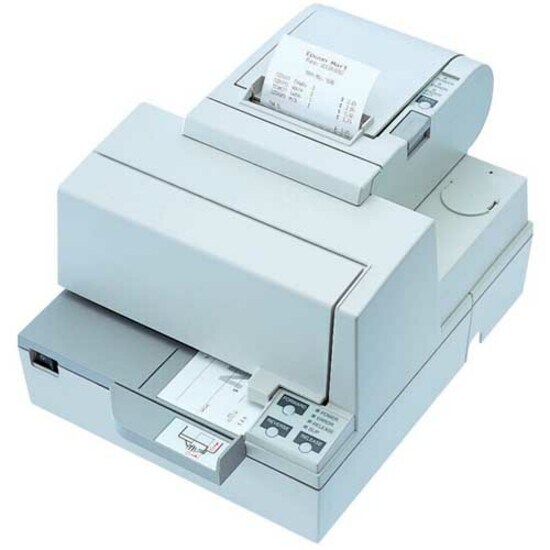
TM-H5000II SER WHT NO MICR PSU
TM-H5000II SER WHT NO MICR PSU
Product Overview
Epson TM-H5000II Direct Thermal Printer - Monochrome - Receipt Print - Serial - With Cutter - 28.4 lps Mono - 180 dpiAutomatic Cutting
Combining the benefits of both thermal and impact technologies, Epson's incredibly fast and flexible TM-H5000II opens the door to a new world of Point of Sale opportunities. The super performance and flexibility of our TM-H5000II gives you options at the Point of Sale you never thought possible. With breath taking speed 28.4 lps - combined with an advanced graphics capability, it will help you transform the humble receipt into a powerful sales tool, while its A4 impact-printing capability gives you total freedom to customise your authorisation and credit slips.
- Produce high-quality documents with this monochrome printer to increase your productivity
- The printer is capable of printing sharp and detailed monochrome documents quickly
- A smart and inexpensive solution to print temporary documents
- Direct Thermal Printer provides you with all the features that you need to print quickly and easily
- Conveniently print your receipts
Technical Specifications
| Serial Port | Yes |
| Input Voltage | 24 V DC |
| Cutting Method | Automatic |
| Cutter | Yes |
| Additional Information | Thermal roll paper 79.5 ± 0.5dia 83.0mm |
| Platform Supported | PC |
| Product Type | Direct Thermal Printer |
| Manufacturer Part Number | C31C246012 |
| Manufacturer Website Address | http://www.epson.com.au |
| Manufacturer | Epson Corporation |
| Product Model | TM-H5000II |
| Product Name | TM-H5000II POS Thermal Receipt Printer |
| Brand Name | Epson |
| Height | 201 mm |
| Width | 252 mm |
| Depth | 331 mm |
| Number of Columns | 56 |
| Recommended Use | Receipt Print |
| Print Color Capability | Monochrome |
| Maximum Print Resolution (dpi) | 180 |
| Media Size | A4 |
| Media Thickness | 70 µm |
| Maximum Roll Diameter | 83.82 mm |
| Media Type | Receipt |
| Plain Paper | |
| Thermal Paper |
Price Trend
Need Technical Support?
Get expert advice from our technical team for installation and configuration help.
Contact Support